On this page
- The slow-burn problem
- What a code health trend looks like in code health terms
- Signals that predict decline
- Hotspot health falling
- Worst-performer trajectory
- Untested-hotspot growth
- How to alert on it
- A monthly review template
- 1. Start with the top movers
- 2. Check hotspot concentration
- 3. Inspect the worst performers
- 4. Review dependency exposure
- 5. Compare against last month’s action list
- 6. Decide one cleanup action per module
- Worked example: 90 days on a real repo
- Days 0–30
- Days 31–60
- Days 61–90
- The lesson
- Why this matters for AI-assisted development
- FAQ
- What is declining code health?
- How do I detect a code health trend early?
- What is code regression detection in practice?
- Can code quality monitoring predict decline?
- What signals matter most?
- How often should I review code health?
Declining code health is usually a slow-burn problem. Teams feel it as “everything takes longer” long before they see a hard failure. The trick is not finding a single bad score. It is spotting the code health trend while it is still small, then pairing it with code quality monitoring that tells you where the next regression is likely to land. Research on technical debt forecasting shows this is a real problem space, not a gut-feel one, and hotspot-based methods keep showing up because change concentration matters more than raw size. (arxiv.org) For the full picture, see the complete code-health guide.
Part of the Code Health guide.
The slow-burn problem
Most teams already have some form of code quality monitoring: lint rules, tests, static analysis, maybe a score in CI. That catches local defects. It does not tell you whether the codebase is drifting toward worse maintainability. Declining code health shows up first in small shifts: more churn in already messy modules, a rising share of work going into a narrow set of files, or a hotspot that keeps getting touched without any cleanup. That pattern is exactly why hotspot analysis is useful: it focuses on the few places where maintenance effort concentrates. CodeScene’s own docs describe hotspots as the places where teams spend most of their development time, and pair them with code health to prioritize improvement work. (community.codescene.com)
You do not need perfect prediction to get value. You need early warning. If the same files keep receiving commits, bugs, and feature work while their structure gets worse, a predicted decline becomes much more useful than a postmortem. A recent literature review on technical debt forecasting found only a small set of primary studies, which is a hint that the field is still young. That is fine. The practical move is to detect trend breaks using signals you already have in git history and dependency structure. (arxiv.org)
What a code health trend looks like in code health terms
A code health trend is a time series, not a snapshot. One red file does not matter much. Three months of red files becoming more common does. The shape matters:
| Pattern | What it means | Why it matters |
|---|---|---|
| Flat low score | A known ugly area that is stable | Annoying, but predictable |
| Slow decline | Structure is getting worse under active change | This is the early warning case |
| Sharp drop after a feature burst | New work landed without enough cleanup | Regression risk is high |
| Volatile score | Repeated redesign or ownership churn | Hard to reason about, easy to break |
Scroll the table sideways to see every column.
A healthy monitoring loop tracks at least four axes:
- Score level: current code health.
- Slope: change over time.
- Breadth: how many files or modules are affected.
- Exposure: how many dependents sit downstream.
That last point matters. A declining module with no dependents can wait. A declining module that sits on the main request path cannot. Dependency graphs help you separate cosmetic decline from operational risk. repowise’s dependency graph layer is built for that kind of path analysis, and the same repo intelligence can be surfaced to AI agents through MCP tools such as get_dependency_path(source, target) and get_risk(). (github.com)
{{IMAGE: declining-code-health-trend | Declining Code Health Trend Dashboard | Monochrome teal-gray CRT dashboard with a left sidebar showing "Code Health", "Hotspots", "Ownership", "Dependencies"; main panel with a line chart labeled "Code Health Score", x-axis labels "Jan", "Feb", "Mar", "Apr"; a second small chart labeled "Hotspot Count"; table below with columns "Module", "Score", "Slope", "Dependents"; retro terminal font, scanline texture, no neon, no saturated colors }}
Signals that predict decline
The best signals are boring. They come from the system you already trust: git history, dependency structure, test coverage, and hotspot movement. Trend detection works when you treat each one as an input, then look for agreement.
Hotspot health falling
Hotspots are the strongest signal because they combine churn and complexity. A file that changes often and is already hard to understand is where decline usually starts. If that file’s score keeps sliding for several review cycles, you are not looking at noise. You are watching maintenance debt accumulate.
What to watch:
- Hotspot score down two or more review cycles in a row.
- Churn rising while complexity stays flat or rises.
- The same hotspot appearing in multiple PRs from different engineers.
- A hotspot gaining dependents without a cleanup pass.
CodeScene’s public material frames this the same way: hotspot analysis highlights where teams spend most of their development time, and code health helps prioritize improvement inside those hotspots. (community.codescene.com)
Worst-performer trajectory
The worst file in a module is often the canary. If your lowest-scoring file gets worse every month, the module is usually following behind it.
Track:
- Bottom 10% file scores by module.
- Month-over-month change for the worst file.
- Count of files crossing below a chosen threshold.
- Whether the worst file is also among the most changed files.
A useful rule: if the worst file is declining faster than the module average, treat it as a leading indicator. That is a predicted decline signal, even if the module average still looks acceptable.
Untested-hotspot growth
A hotspot with poor tests is a larger risk than the same hotspot with strong coverage. When those two overlap, decline tends to become visible later and costs more to reverse. If untested hotspots are growing, your code health trend is getting worse even if the headline score stays steady.
Watch for:
- Hotspots with low or missing tests.
- New hotspots created in code paths with no test increase.
- A rising gap between critical files and their test files.
- Declining health paired with flat test additions.
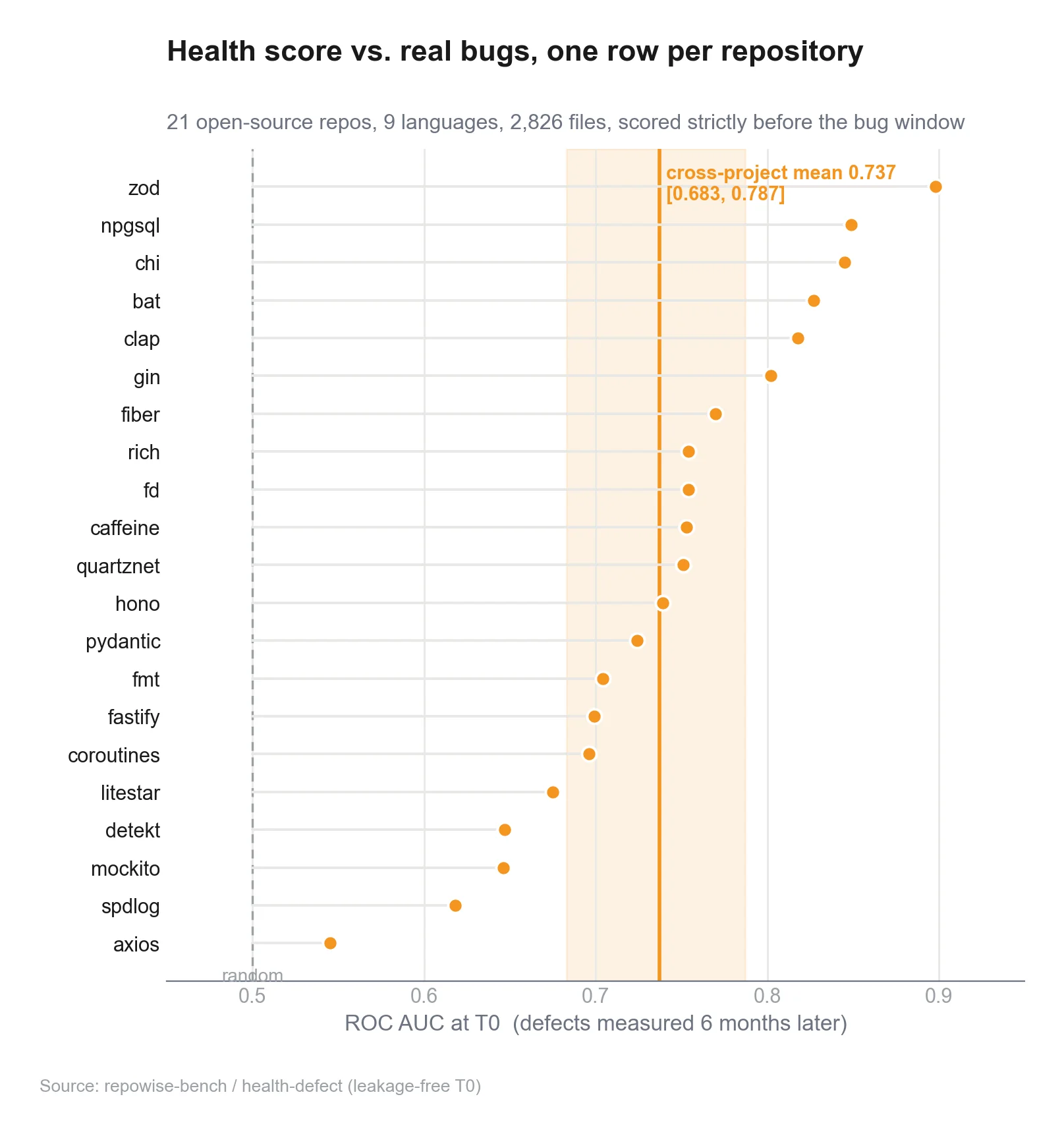
repowise's code health markers include per-file health, module rollups, untested-hotspot detection, and refactoring targets ranked by impact per effort. That is exactly the kind of signal stack you want for decline detection, because it ties score drift to action. Code health itself splits into three co-equal signals (defect risk, maintainability, and static performance risk), never blended into one number, so a decline in one pillar doesn't get masked by a stable score in another. (github.com)
{{IMAGE: hotspot-trajectory-monitor | Hotspot Trajectory Monitor | Monochrome teal-gray CRT interface with two stacked panels: top panel titled "Hotspot Health" showing descending spark lines; bottom panel titled "Untested Hotspots" with a table containing "File", "Churn", "Complexity", "Tests"; text labels visible, gridlines thin, terminal-like typography, no glow, no bright colors }}
How to alert on it
Alerts should fire on direction, not just thresholds. A static threshold tells you a file is bad. A trend alert tells you it is getting bad fast. That is the difference between code quality monitoring and code regression detection.
Use three kinds of alerts:
-
Slope alert
- Trigger when a file or module drops by more than X points over Y days.
- Good for hotspots and core modules.
-
Rank-change alert
- Trigger when a file enters the worst decile or falls below the module median.
- Good for catching silent decline across a broad codebase.
-
Exposure alert
- Trigger when a declining module has many dependents or sits on a critical path.
- Good for prioritization.
A simple monthly policy works well:
- Alert only after the trend repeats in two consecutive windows.
- Suppress alerts for files with no recent changes.
- Escalate if decline and test stagnation happen together.
- Page humans only when the dependent graph says the blast radius is large.
If you want this wired into an agent workflow, MCP is now stable enough to support real tooling ecosystems. The current specification version is 2025-11-25, and the protocol defines date-based versioning plus a registry that recommends semantic versioning for published servers. (modelcontextprotocol.io)
A monthly review template
Use the same review every month. Consistency is what makes trend detection real.
1. Start with the top movers
List the modules whose health fell the most in the last 30 days.
2. Check hotspot concentration
Ask whether churn is concentrating in fewer files.
3. Inspect the worst performers
Open the bottom 10 files by score and look for repeated edits, complex branching, and missing tests.
4. Review dependency exposure
Mark any declining files that sit upstream of many dependents.
5. Compare against last month’s action list
If the same files are still red, your fixes were too small or too local.
6. Decide one cleanup action per module
Do not write a long remediation plan. Pick one change that can reduce risk in the next cycle.
A practical review table:
| Module | Health trend | Hotspot? | Tests | Dependents | Action |
|---|---|---|---|---|---|
| auth | falling | yes | low | high | split validator, add tests |
| billing | flat | yes | medium | high | leave alone |
| jobs | falling | no | low | medium | inspect coupling |
| docs | rising | no | high | low | no action |
Scroll the table sideways to see every column.
repowise’s auto-generated wiki and architecture views can help here because they turn a repo into something you can query by module, symbol, and decision record instead of by memory. See our architecture page to understand how repowise works, or try the FastAPI dependency graph demo to see the dependency layer in action. (github.com)
Worked example: 90 days on a real repo
Here is the shape of a real decline story.
Days 0–30
The module looks fine on aggregate. One hotspot score is already low, but the rest of the module is stable. The team ships features.
Days 31–60
The same hotspot gets touched in three PRs. Churn rises. The file’s score drops. Tests stay flat. No one notices because the module average barely moves.
Days 61–90
A second file in the same dependency cluster starts to slide. The hotspot now has more dependents, and bug fixes start landing in adjacent code. The decline is no longer local. It is a module pattern.
That is the moment to act. Not after the incident. Not after the rewrite ticket. Right when the slope changes.
On a repo with good git intelligence, the answer usually sits in the overlap between ownership and change behavior. Who touched the file? Did multiple engineers edit it? Did the file become a coordination point? repowise’s ownership map and hotspot analysis are designed for exactly that kind of question, and the repo examples page shows what these views look like on a real codebase. See what repowise generates on real repos in our live examples, and explore the hotspot analysis demo for a concrete view of change concentration. (github.com)
The lesson
A declining code health trend rarely announces itself with one giant drop. It shows up as a repeated pattern:
- hotspots get hotter,
- the worst files stay worst,
- tests fail to keep up,
- and dependency exposure grows.
That is enough to predict trouble before users feel it.
Why this matters for AI-assisted development
AI coding tools make it easier to produce more code faster. That is useful only if the surrounding codebase can absorb the change. MCP is the standard layer that lets tools and agents request structured context from external systems, and the official spec plus SDKs are now maintained as a real ecosystem, not an experiment. (github.com)
That matters for decline detection because agents need more than file text. They need:
- ownership,
- change history,
- dependency paths,
- decision records,
- and risk signals.
repowise exposes those through MCP so an agent can ask, “What is most likely to break if I change this file?” That is a better question than “What files mention this symbol?”
FAQ
What is declining code health?
It is a downward trend in maintainability signals over time. A codebase can still pass tests and compile while its health declines. The warning signs are rising churn, growing hotspot concentration, more complex edits, and weaker test coverage in critical areas. (community.codescene.com)
How do I detect a code health trend early?
Track scores monthly or per release, then compare slope, not just level. Look for repeated drops in hotspots, worsening worst-performer files, and overlap between decline and low test coverage. Dependency graphs help you rank the blast radius. (community.codescene.com)
What is code regression detection in practice?
It is the practice of flagging structural backsliding in the codebase, not just failing tests. A regression can be a file that becomes harder to change, a module that accumulates hidden coupling, or a hotspot whose score drops after each PR. (helpcenter.codescene.com)
Can code quality monitoring predict decline?
Yes, if it watches trend direction and not only thresholds. Static thresholds say “bad.” Trend-based monitoring says “getting worse.” That is enough to create a predicted decline signal before the team feels pain. The technical debt forecasting literature supports this direction, even if the research base is still small. (arxiv.org)
What signals matter most?
Start with hotspots, worst-file trajectories, and untested hotspots. Then add dependency exposure and ownership churn. Those signals are more actionable than aggregate repo scores because they point to the places where change is concentrated and risk is growing. (community.codescene.com)
How often should I review code health?
Monthly is enough for most teams. High-change systems may need weekly checks. The key is consistency. The same interval lets you compare slope, not just snapshots, and makes declining code health visible before it turns into an incident.