On this page
The best code search tools for engineering teams in 2026 are Sourcegraph for large organizations on several code hosts, GitHub code search for teams that live in GitHub, and Zoekt or OpenGrok when you want an open-source engine you run yourself. Pick repowise when the question is "where is this behavior, who owns it and what depends on it", not only "where is this string".
The short list, as of October 2026:
- Sourcegraph: full-text, regex, symbol, commit and diff search across many repositories and code hosts.
- GitHub code search: built into GitHub, with regex, symbol search and path filters.
- Zoekt: fast open-source trigram search, the engine inside Sourcegraph.
- OpenGrok: open-source source browser and cross-reference engine, long used in large Java shops.
- Greptile: an AI code review agent that indexes your whole repository.
- repowise: semantic search over the code graph and generated docs, with ownership, dependencies and health attached to every result.
We build repowise, so weigh our entry accordingly. The measurements we publish about it, with their methods, are on the benchmarks page.
How we evaluated
We read each vendor's own documentation and pricing page on 12 October 2026 and compared them on what a team decides on. We did not run a retrieval benchmark for this post.
- Search modes: exact and regex, symbol, and meaning-based (semantic).
- Scope: how many repositories and code hosts one query can cover, and what history it can search.
- Where it runs: hosted, self-hosted, or both, and what plan that needs.
- Agent access: whether an AI agent can call it through an API or MCP.
Comparison table
| Tool | Exact and regex | Symbol | Semantic | History search | Self-host | Starting price (October 2026) |
|---|---|---|---|---|---|---|
| Sourcegraph | Yes | Yes | Query assist and Deep Search | Commits and diffs | Enterprise | Enterprise from $16K a year |
| GitHub code search | Yes | Yes (symbol:) | Through Copilot surfaces | No | No | Included with GitHub |
| Zoekt | Yes | Symbol-aware ranking | No | No | Yes (Apache 2.0) | Free |
| OpenGrok | Yes | Cross-references | No | VCS history | Yes (CDDL 1.0) | Free |
| Greptile | No | No | Yes | PR context | Enterprise | Free Starter; Pro $30/seat/month |
| repowise | Identifiers and literals | Yes | Yes | Git history, co-change, decisions | Yes (AGPL-3.0) | Free and open source; hosted Free is two public repositories |
Scroll the table sideways to see every column.
Exact, symbol and semantic search: what each answers
Exact and regex search finds a string you already know; semantic search finds code by what it does. Regex is fast, predictable and the right tool for config keys, error strings and known identifiers. It misses code whose names differ from your words.
Semantic search covers the other case: "where do we validate OAuth tokens" or "what handles retries after a 429". It can surface plausible neighbors, so the useful implementations show why a result matched and what surrounds it. Symbol search sits between the two, returning definitions and references rather than text.
Teams need all three, plus freshness. An index that lags the default branch by hours stops being trusted, so test how quickly a new commit becomes searchable before you commit to a tool.
Sourcegraph
Sourcegraph is the most complete code search platform here, built for large codebases spread across many repositories and code hosts. Its documented search features include full-text and regex (RE2) queries, type:symbol, type:commit and type:diff search, saved searches, search contexts, and multi-branch indexing of up to 64 branches per repository. Query assist translates plain English into a search, and Deep Search is its AI agent for code questions.
As of October 2026 the pricing page lists a single Enterprise plan from $16K a year, with an MCP server, API and CLI included. Its deployment docs cover Sourcegraph Cloud, Kubernetes (Helm) and Docker Compose, all on Enterprise plans. Our Sourcegraph comparison goes deeper.
Pick Sourcegraph if you have many repositories across several code hosts and want one search and navigation layer with commit and diff search.
GitHub code search
GitHub code search is the lowest-friction option for teams already on GitHub. The documentation describes regex, boolean operators, qualifiers and a symbol: qualifier for function and class definitions, across your repositories and public open source.
It has documented limits: it searches the default branch only, skips very large repositories, vendored and generated code and files over 350 KiB, caps results at 100, and states that exhaustive search is not supported. That suits "find an example" and "who uses this API" well, and it is less suited to audits that must see every match.
Pick GitHub code search if your repositories are on GitHub and you want search with no new system to run.
Zoekt
Zoekt is a fast, open-source trigram search engine for source code. Its repository describes substring and regex matching with boolean queries, symbol-aware ranking, a web UI and JSON API, and an Apache 2.0 license. Sourcegraph maintains it, and it powers indexed search inside Sourcegraph.
Zoekt is a search backend: it does not do semantic retrieval, wikis or git analytics, and you build the surrounding product yourself. That is the appeal for a platform team that wants a literal-search core it fully controls.
Pick Zoekt if you are building an internal developer platform and want a proven open-source search engine to embed.
OpenGrok
OpenGrok is an open-source source browser and cross-reference engine, originally built at Sun Microsystems. The project is written in Java, licensed CDDL 1.0, runs in Docker, and integrates with version control systems to show history alongside search.
It is a mature choice for teams with large, long-lived codebases who want a self-hosted browser with cross-references. It does not offer semantic search.
Pick OpenGrok if you want a self-hosted code browser with cross-references and VCS history, and your queries are mostly literal.
Greptile
Greptile is an AI code review agent that indexes your whole repository, so it belongs here as a context system rather than a search box. Its pricing page lists a free Starter plan, Pro at $30 per seat a month with 50 credits per seat, and Enterprise with self-hosting. Reviews cost 1, 3 or 10 credits depending on type.
Choose it for pull request review with repository context. If your need is humans searching code every day, one of the other tools is a better first stop. The Greptile comparison covers where the two differ.
Pick Greptile if your main problem is review quality on pull requests.
repowise
repowise is semantic code search built on a code graph, so every result arrives with its owners, dependents, history and health. It indexes your repository once into a graph of files, symbols and calls, a git-history layer and a generated wiki. search_codebase then ranks across those with hybrid retrieval: SQLite full-text and vector results merged by Reciprocal Rank Fusion, biased by PageRank. Full-text works with no embedder, and semantic search needs one configured.
As of 0.56, identifier and literal queries return the matching source lines (path, line, kind, text, definitions first) with a complete flag, so an agent knows when it has every match. Prose queries rank files and symbols and attach matched lines. From the terminal, repowise search "where do we validate tokens" runs the same index, and repowise ask gives a cited answer.
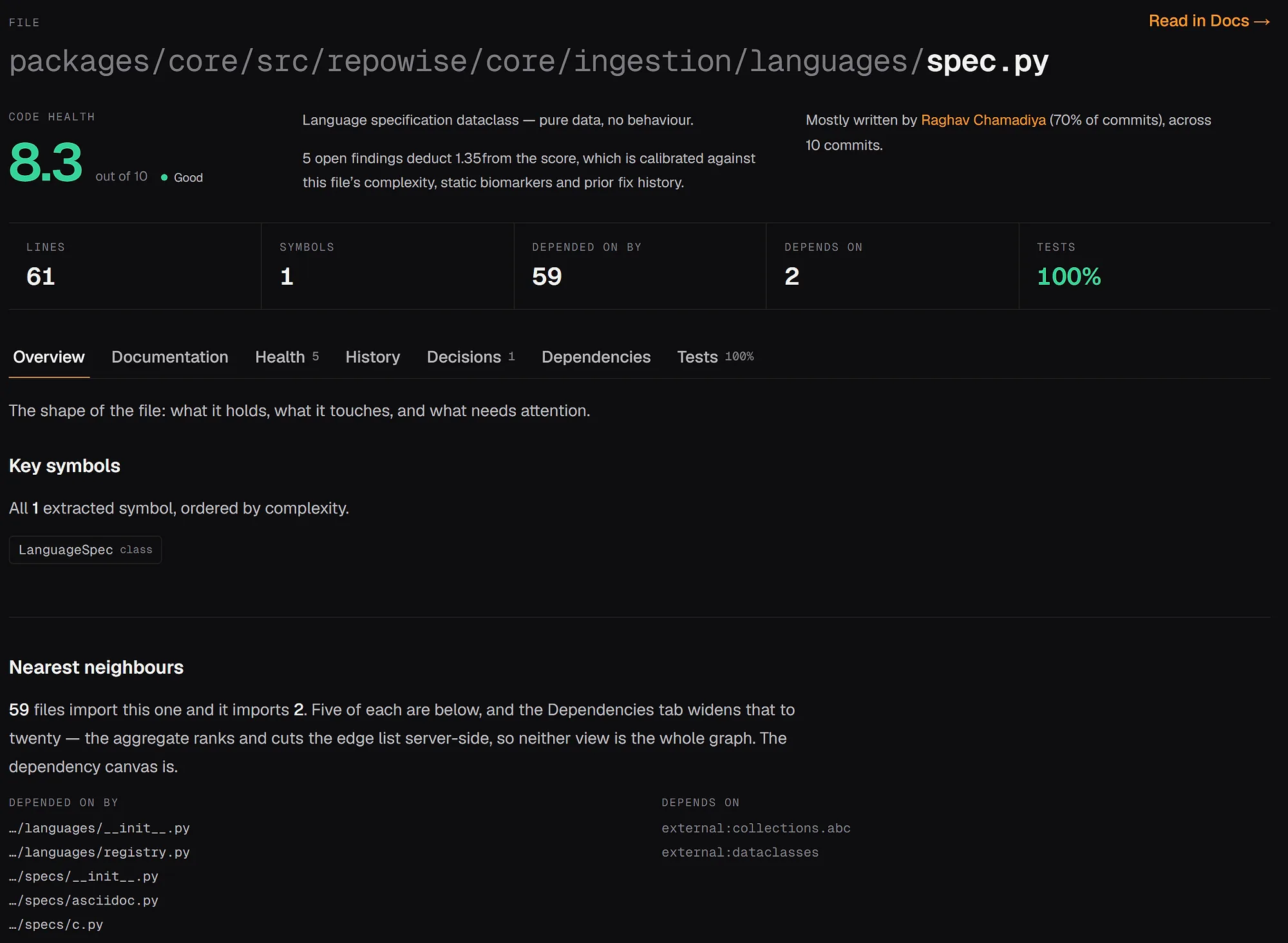
For agents, repowise serves ten MCP tools: get_answer, get_context, get_symbol, search_codebase, get_why, get_risk, get_change_risk, get_health, get_dead_code and get_overview. get_context with include=["references"] lists every edit site of a symbol, checked against live files. repowise init registers the server with Claude Code, and repowise init --codex writes the Codex config (repowise for AI agents). Browse real indexed repositories in the live examples, or read how it works on the architecture page.
repowise is open source under AGPL-3.0 and self-hostable. Hosted Free covers two public repositories and ten AI answers a month, with private repositories on Pro.
Pick repowise if you want search that explains what it found, with ownership and dependency context, and AI agents that call it directly. Teams can start from repowise for teams.
How to choose
Choose by the constraint that is hardest to change: where your code lives, whether it may leave your network, and who is searching.
| Your situation | Start with |
|---|---|
| Large org, many repositories, several code hosts | Sourcegraph |
| Everything on GitHub, want zero new infrastructure | GitHub code search |
| Platform team building its own search | Zoekt |
| Self-hosted code browser with cross-references | OpenGrok |
| Agents and engineers asking "where is this behavior" | repowise |
| Pull request review is the real pain | Greptile |
Scroll the table sideways to see every column.
Tools combine well. Run Zoekt or GitHub search for literal lookups and repowise for meaning, ownership and agent access through MCP. To decide, take five questions your team asked this month, run them in each shortlisted tool, and keep the one whose first result you would have opened.
FAQ
- What is the best code search tool for large engineering teams?
- Sourcegraph is the strongest all-around platform for large teams because it combines full-text, regex, symbol, commit and diff search across many repositories and code hosts. It is sold as an Enterprise plan, starting from $16K a year as of October 2026.
- What is the best Sourcegraph alternative?
- For an open-source engine, Zoekt is the closest technical match for literal search, and OpenGrok suits self-hosted code browsing. For meaning-based search with ownership and dependency context, repowise is the alternative to evaluate. See the full comparison.
- Is semantic code search better than grep?
- Not for every task. Grep and regex are best when you know the exact string; semantic search is better when you know the intent but not the identifier. The strongest setups use both.
- Can I self-host a code search engine?
- Yes. Zoekt, OpenGrok and repowise are open source and self-hostable, and Sourcegraph self-hosts on Enterprise plans through Kubernetes or Docker Compose. GitHub code search is part of GitHub's own product.
- Does MCP matter for AI code search?
- Yes. MCP gives agents a standard way to call structured tools instead of pasting files into a prompt. repowise exposes search, context, risk and health as ten MCP tools, and Sourcegraph's Enterprise plan includes an MCP server.
- Should I replace GitHub code search?
- Not if your repositories are all on GitHub and your needs are basic. Add another tool when you need search across hosts, every match on non-default branches, or richer agent workflows.