On this page
Code health is a per-file estimate of how much friction the next change will create, built from code structure, coupling, test signal and git history. repowise scores every file from 1 to 10 using 25 markers that feed the headline defect-risk score (it registers 53 detectors in total; the rest feed the separate maintainability and performance signals). A low score means look here first, not this is broken.
Part of the code health guide.
What is code health?
Code health answers one question: where will future work slow down, and why? A file can be short but tangled. A module can be clean but surrounded by fragile callers. A repo can have good tests and still be hard to change because a few files absorb most edits. A useful measure needs four ingredients:
- Structure: how hard the code is to read and reason about.
- Coupling: what depends on it, and what it depends on.
- Test signal: whether changes are guarded by meaningful tests.
- Churn signal: whether history says the file keeps changing, breaking or losing its owner.
Other tools measure parts of this. SonarQube Server reports maintainability, reliability, duplication, coverage and complexity metrics, and CodeScene defines Code Health as an aggregate of 25+ factors on a 1 to 10 scale (as of October 2026). repowise combines the same four ingredients in one per-file score and keeps the reason beside the number.
Why averages hide the files that matter
A repo-wide average can improve while the riskiest file gets worse. If one module scores 9 and another scores 2, the mean looks fine. CodeScene makes the same point: a single KPI is not enough, and averages can hide low-scoring files that carry risk.
repowise reports three repository figures instead of one: average health, hotspot health (hotspot files only) and the worst performer. Bands are absolute, so a 6.2 means the same in every repository.
| Band | Score | Meaning |
|---|---|---|
| Excellent | 8.5 and above | Low risk, easy to change |
| Good | 7.0 to 8.5 | Sound; nothing demands attention |
| Fair | 5.5 to 7.0 | Rising complexity or process risk |
| Needs work | 4.0 to 5.5 | Worth scheduling |
| At risk | under 4.0 | Where defects concentrate |
Scroll the table sideways to see every column.
Each file starts at 10. Every finding deducts its severity times its marker weight, deductions are capped per family so no single family dominates, and the result is clamped to 1 to 10.
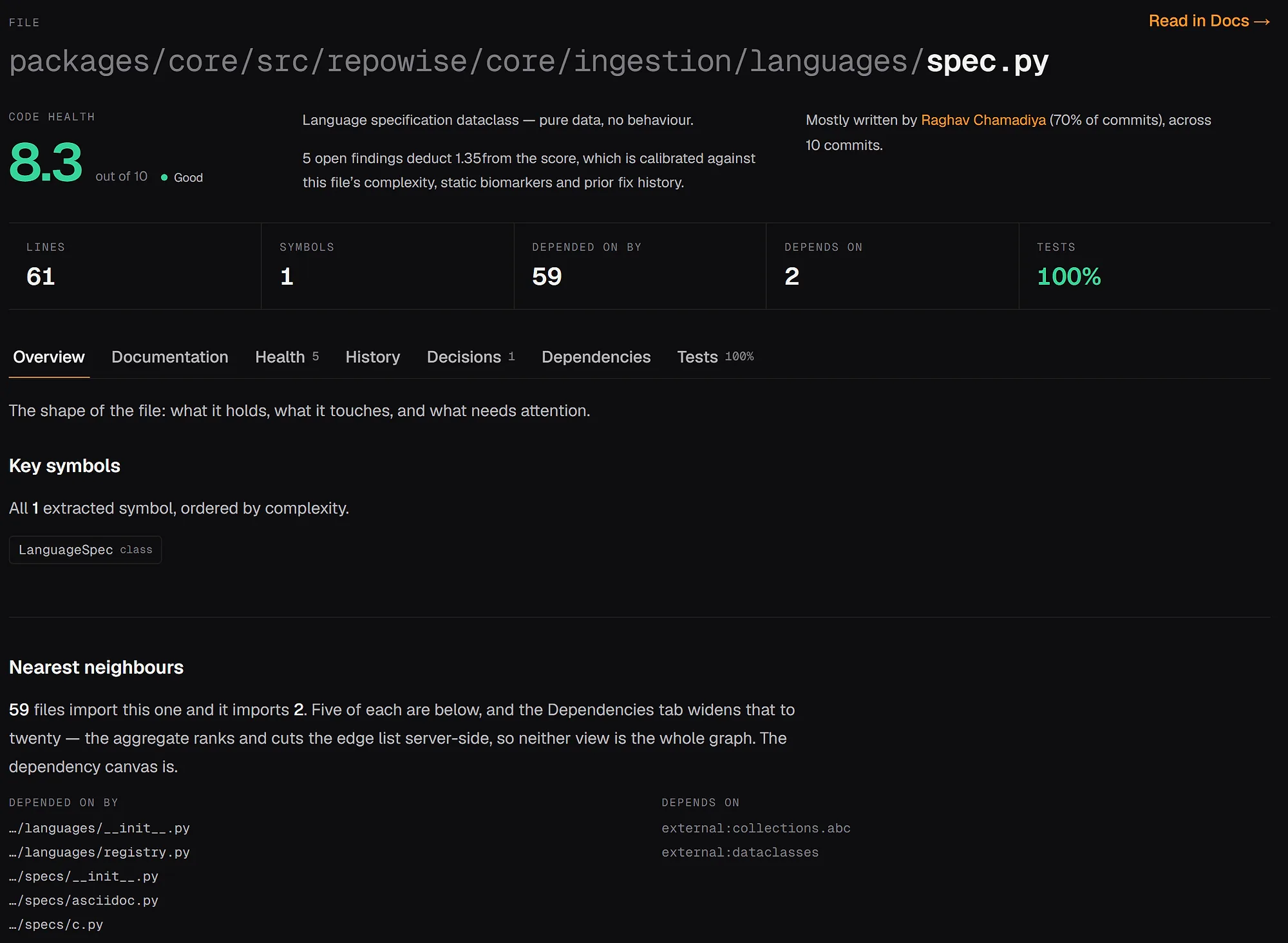
A file page in repowise's own repository: the score, its band, and the dependency and test context beside it.
The 25 markers
The markers fall into five families: complexity, design and duplication, coupling, test signal and churn. The grouping matters more than the exact thresholds. Full detector roster: code health architecture docs.
Complexity
| Marker | Flags |
|---|---|
| Complex method | Functions with cyclomatic complexity (CCN) of 9 or more |
| Nested complexity | Functions nested more than 4 levels deep |
| Bumpy road | Several medium-depth nesting humps side by side |
| Large method | Long bodies that also carry branching |
| God class | A class of 200+ NLOC with 15+ methods and a brain method |
| Complex conditional | Conditions glued from three or more boolean operators |
| Function hotspot | Functions that are both complex and frequently modified |
Scroll the table sideways to see every column.
Design and duplication
These deduct at half weight in the defect score, because on their own they proved weak bug predictors. The maintainability signal counts them in full.
| Marker | Flags |
|---|---|
| Brain method | 70+ lines, CCN 9+, in a file many others import |
| Low cohesion | A class whose methods split into groups sharing no fields (LCOM4 of 2 or more) |
| Long parameter list | Five or more raw parameters that want to be one object |
| DRY violation | Duplicated code, weighted up when copies change together |
| Error handling | Swallowed or catch-all handlers, Rust unwrap and panic!, ignored Go errors |
Scroll the table sideways to see every column.
Coupling
| Marker | Flags |
|---|---|
| Co-change scatter | A file coupled to many distinct co-change partners (shotgun surgery) |
| Knowledge loss | A bus factor of 1 where that author has left or makes under 20% of recent commits |
Scroll the table sideways to see every column.
Test signal
| Marker | Flags |
|---|---|
| Untested hotspot | A churning, widely imported file with no meaningful coverage |
| Coverage gap | Significant uncovered surface in a non-trivial file (needs a coverage report) |
| Coverage gradient | A continuous deduction proportional to the uncovered fraction |
| Large assertion block | One test with 15+ consecutive assertions |
| Duplicated assertion block | Copy-pasted assertion sequences across tests |
Scroll the table sideways to see every column.
Churn signal
| Marker | Flags |
|---|---|
| Churn risk | Churn normalised by file size, a stronger predictor than raw churn |
| Change entropy | Changes scattered across wide, noisy commits |
| Code age volatility | Dormant code that is suddenly modified again |
| Developer congestion | 5+ contributors, top-quarter churn, nobody owning half |
| Ownership risk | Many drive-by authors, none above 40% |
| Prior defect | Recent bug-fix history, the cheapest predictor of the next fix |
Scroll the table sideways to see every column.
History amplifies code risk; it does not stand alone. Git history costs a file at most 1.0 point, plus one point for each point its code-shape findings deduct, up to 3.5. A simple file that changes often reads as busy, not broken, and never drops below 9.0 from history alone.
Does the score predict bugs?
Yes, measurably. repowise scored files at a historical commit and checked them against the next six months of bug fixes, with nothing after that commit feeding the score. ROC AUC was 0.74 across 21 repositories and 9 languages, +0.10 AUC over ranking by recent churn, and 0.76 to 0.78 on the external PROMISE/jEdit corpus. Against CodeScene on the same files, repowise surfaced 2.3x the defects under a 20%-of-lines review budget. Method and reports: benchmarks.
From score to decision
A per-file score is useful when it says what would make the file safer to touch. In repowise:
repowise init             # full index; scores every file, no LLM key
repowise health           # fix first, KPIs, lowest-scoring files
repowise health --trend   # the last 10 snapshots
repowise next             # the short cross-layer to-do list
Agents get the same data through the get_health MCP tool, per repo or per file. Then triage the lowest files:
| Pattern | Likely fix |
|---|---|
| High complexity, low churn | Refactor only when you next touch it |
| High complexity, high churn | Schedule a dedicated cleanup |
| Widely imported, low coverage | Add characterization tests first, then split |
| Many co-change partners | Revisit module boundaries |
| Knowledge loss on an active file | Pair on it and write down the decisions |
Scroll the table sideways to see every column.
The fix-first list ranks one unit of work per item with the first edit, expected gain, effort and the tests to run. For a larger refactor, see refactoring priorities by impact per effort.
Reading a trend
A falling score says more than a low one. Every init and update stores a snapshot, and repowise alerts on declining (a fall of 0.5 or more against five snapshots back), predicted decline (three falls in a row) and history drag (the git-history half moved, so nothing in the code needs action). A file that dropped from 8 to 6 in two months is an active feature under pressure. A file flat at 6 for a year is known debt. More: declining code health trends.
FAQ
- What is code health in software engineering?
- Code health is a measure of how costly future changes to code will be. It combines structure, coupling, testing and change history so teams can spot risk before it turns into slow delivery.
- What are code health metrics?
- They are the measurements used to estimate maintainability and defect risk: complexity, nesting, coupling, coverage, churn, co-change and ownership. repowise turns them into 25 markers that move a per-file score.
- What is a good code health score?
- In repowise, 7.0 and above is Good and 8.5 and above is Excellent. Under 4.0 is At risk, where defects concentrate. Bands are absolute, so scores compare across repositories.
- Is a code health score enough on its own?
- No. A score is a summary, not a diagnosis. The markers show whether the cause is complexity, coupling, missing tests or churn, and that decides the fix.
- Does repowise need an LLM key to score code health?
- No. Scoring reads the parse tree, the dependency graph and git history, and runs inside
repowise initandrepowise update. - How do I improve code health without a big refactor?
- Start with the top fix-first item. Add a test around current behavior, make one extraction, and re-score with
repowise update, which re-scores only changed files.