Architecture
See your system as it really is.
C4 views and dependency graphs drawn from the code on every commit, not from memory at the kickoff meeting.
No model in the layout. The same code always draws the same map.
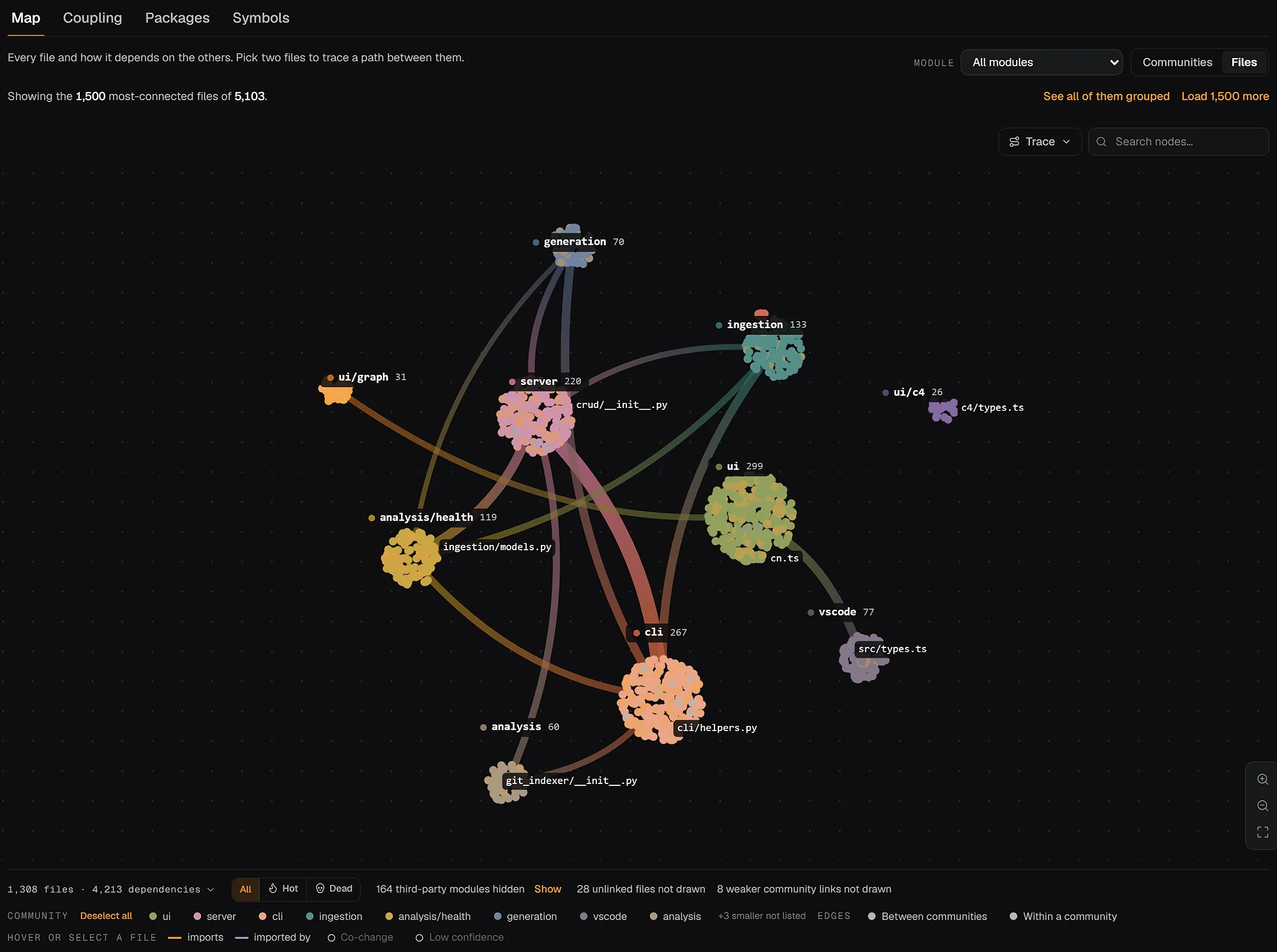
repowise-dev/repowise · 1,500 most-connected files of 5,103
At a glance
- 3
- C4 levels
- System context, containers and components, derived from the real graph.
- 30K+
- graph nodes
- The interactive dependency graph stays legible at this scale.
- 14
- languages with framework edges
- Of 27 parsed languages in total.
- 0
- LLM calls
- No model in the layout path. The same code always draws the same view.
Sound familiar?
The diagram is from the kickoff deck.
- 01
Nobody can say what actually talks to billing.
- 02
The dependency graph is a hairball nobody opens twice.
- 03
The framework's routing hides half the edges.
What makes it different
Three levels of detail, one source of truth.
- C4 views
System, containers, components.
Derived from package info and the real dependency graph, at three levels of zoom.
- Framework edges
Routes connected to their handlers.
Django, FastAPI, Next.js, Spring, ASP.NET, Gin, Rails and more, resolved as real edges.
- What matters
The symbols everything runs through, ranked.
PageRank and execution-flow tracing surface the code most paths depend on.
- Always current
Redrawn on every commit.
The map changes when the code does, with no one asked to update it.
On a real repository
The graph you can actually read.
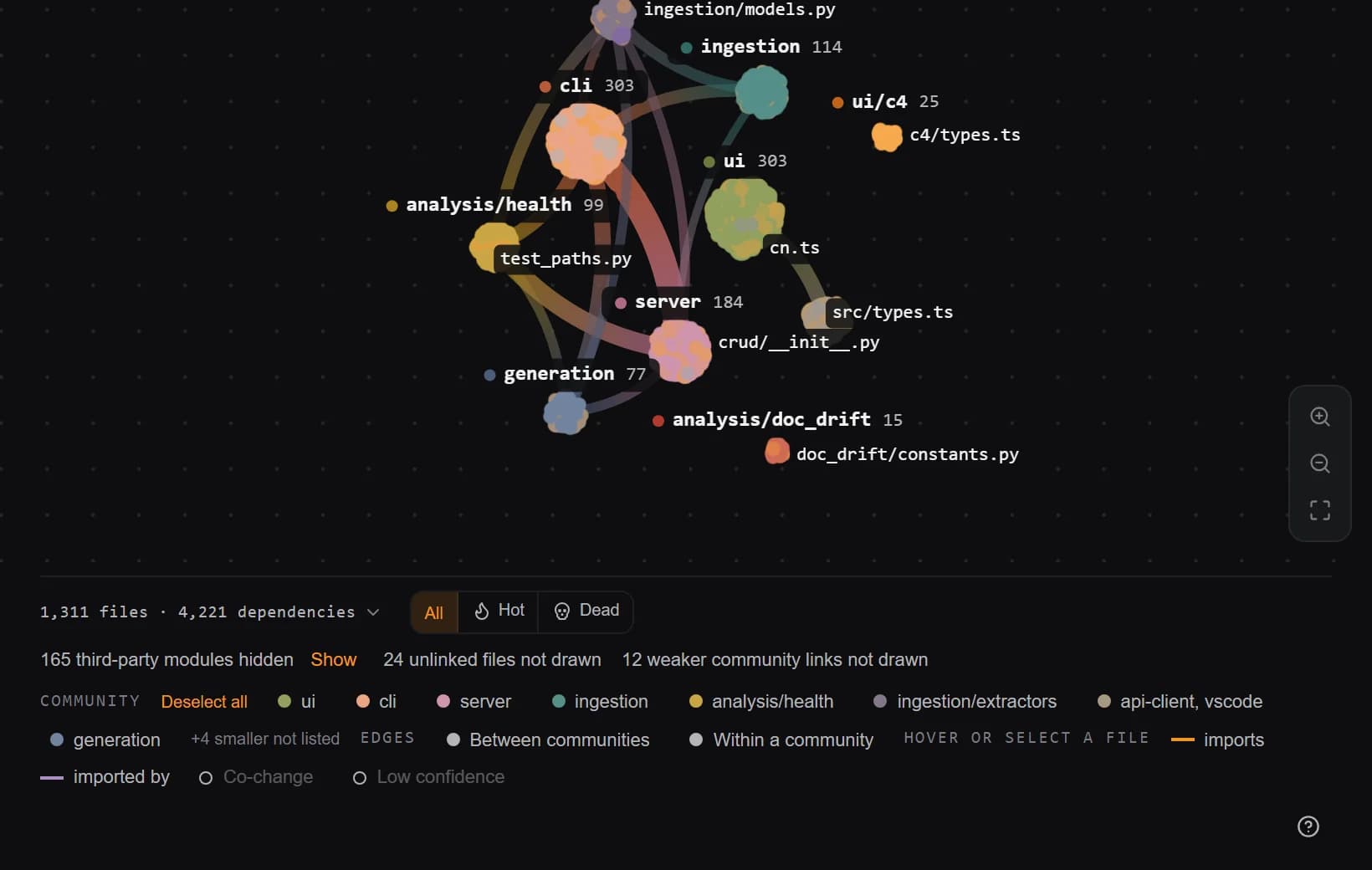
The dependency graph is ranked and traced, not dumped, so the modules most code paths run through stand out and the view stays legible on large repositories.
In plain words
A map of your system drawn from the imports, not from memory.
Repowise parses every file, resolves the edges frameworks hide, and groups the dependency graph into the three C4 levels. Zoom from the whole system to one container to the components inside it. The same code always draws the same map.
How to read it
How to read the three levels
- L1 · System
- Your system as one box, and the outside systems it talks to: a git host, a database, an AI client.
- L2 · Containers
- The deployable parts inside it, read from package manifests: web, api, worker.
- L3 · Components
- The modules inside one container and the real edges between them, routes included.
- Cycles
- Two modules that import each other. The map counts them, and a pull request that adds one gets told.
How it works
Parsed, resolved, derived.
- 01 / Parse
Read every file as a tree
Imports, calls and inheritance across every supported language. - 02 / Resolve
Connect the edges frameworks hide
Route tables, handlers and injected dependencies become graph edges. - 03 / Derive
Zoom out to containers and systems
Packages and manifests group the graph into C4 levels you can read.
Where it shows up
Shows up where the work already happens.
Dashboard
Move between the three levels with the view in the URL, so a link opens the exact slice you were looking at. Colour by language, community or risk.
Coding agents
The overview tool returns the module map and entry points before the agent opens a file, so it starts in the right place.
VS Code
The architecture view sits beside the code, and the explorer shows which module each file belongs to.
Questions
What people ask before they try it.
What are the C4 levels?
C4 is a layered way to read a system at increasing detail. repowise derives three of them straight from your graph: Level 1 system context (the system and the external systems it talks to), Level 2 containers (the deployable or runnable parts, derived from package info with a top-directory fallback), and Level 3 components (the sub-modules inside a container and the relations between them). You move between levels in the dashboard, with the view URL-synced so you can share a link to an exact slice.
Is the diagram kept up to date?
Yes. The view is not hand-drawn and it is not a snapshot you have to remember to refresh. It is derived from the dependency graph, which is rebuilt incrementally on every commit. When the code changes, the containers, components, and edges change with it, so the architecture you see is the architecture that actually ships.
How does it know my framework's routes?
repowise ships framework-aware resolvers that add route-to-handler edges static parsing alone would miss. That covers Django, FastAPI, Flask, Express, NestJS, Next.js App Router, Hono, Remix, SvelteKit, Astro, tRPC, Spring Boot, Jakarta, Quarkus, Micronaut, ASP.NET MVC and Minimal API, Gin, Echo, Chi, Go stdlib net/http, gRPC, Axum, Actix, Rails, Laravel, and more. The result is a graph that connects an HTTP route to the code that actually handles it.
How big a codebase can it handle?
The interactive dependency graph visualization scales to 30K+ nodes. It is laid out with ELK and rendered with React Flow, with PageRank and betweenness centrality used to rank and trace so the view stays legible even on large repositories instead of collapsing into a hairball.
Which languages does it support?
Tree-sitter ASTs across 27 languages, with full-tier depth for Python, TypeScript, JavaScript, Svelte, Vue, Astro, Java, Kotlin, Go, Rust, C++, C#, Scala, and Ruby, and good-tier support for C, Swift, PHP, Dart, Elixir, F#, Objective-C and more. Manifest and config formats including OpenAPI, Protobuf, GraphQL, Dockerfile, and Terraform are parsed for external systems and containers.
Can I see execution flows?
Yes. On top of the static dependency edges, repowise runs execution-flow tracing and uses PageRank and betweenness centrality to surface the symbols that actually matter, the ones most code paths run through, instead of treating every node as equally important. A three-tier call resolution pipeline and a two-tier file plus symbol graph back the trace.
Where does the architecture view live?
It lives in the repowise dashboard alongside the wiki, graph, code health, git intelligence, and decisions, so you can move from a Level 1 system context straight into the file-level documentation and risk for any container. You can explore it on live public repos or self-host it for private code.
Does it use an LLM to draw the diagram?
No. The C4 view is derived deterministically from the dependency graph, package info, and the external-system registry built by manifest parsers. There is no model in the layout path, so the same code always produces the same view and there are no token bills for rendering it.
Last reviewed: October 2026
Get started
Open the map of a repository you know.
Index a public repository free and compare its C4 view with the diagram in your head.